
Update: Windows Server 2016 is available for download @EvalCenter and will be available at October price list. Fully licensed software will be available @VLSC at the mid-October (System Center 2016 Evaluation is here)
As I predicted in the previous posts, TP5 is the latest preview release before Windows Server 2016 RTM/GA. Today Microsoft has finally revealed the official launch dates for Windows Server and System Center 2016.
GA will be announced at Ignite conference that takes place at the end of September and global price lists will be updated in October, 2016 . So, we have enough time to get ready for it. RTM release dates are not available at the moment. But I expect it in August.
Until then let’s review some important facts about upcoming WS and SC new generations.
Windows Server 2016:
- Datacenter Edition includes new advanced software-defined datacenter capabilities designed for highly virtualized private and hybrid cloud environments. Some new features unique to Datacenter Edition include an Azure-inspired networking stack and Azure-inspired storage enhancements including Storage Spaces Direct
- Standard Edition provides the core functionality of Windows Server for lightly virtualized environments
- Essentials. This edition is designed for smaller organizations with less than 50 users.
- Standard and Datacenter editions don’t have the same list of features as we have in Windows Server 2012/2012R2 (except AVMA ). Storage Replica , Storage Spaces Direct , Shielded VMs and New Networking stack are available only in Datacenter
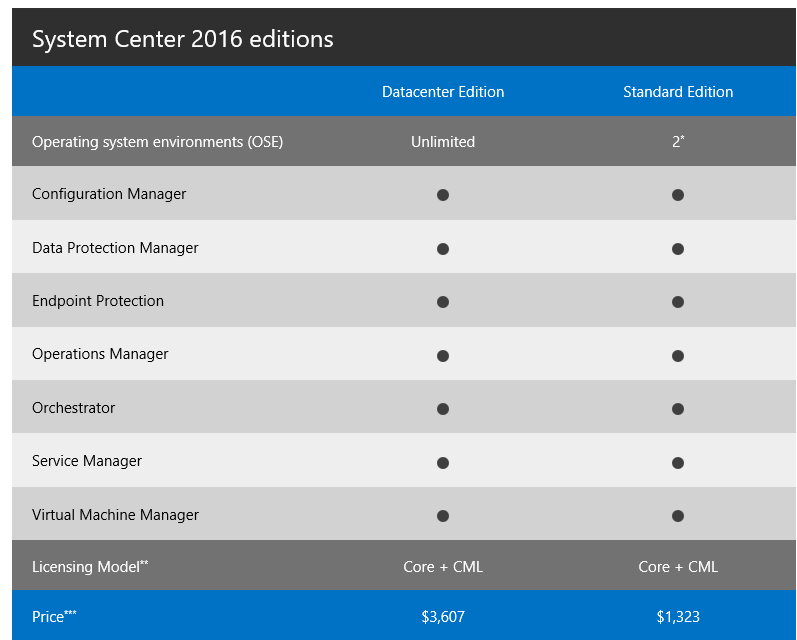
System Center 2016 editions:
- Datacenter is the optimal choice for a large deployments or CSP. 1 license allows you to manage unlimited quantity of OSE (Operational System Environments)
- Standard is built for small infrastructures and provides management rights for only 2 OSEs
Installation Options in Windows Server
- Server with Desktop Experience: The Server with Desktop Experience installation option provides an full user experience for those who need to run an app that requires local UI or for Remote Desktop Services Host. This option has the Windows client shell and experience, consistent with Windows 10 Anniversary edition Long Term Servicing Branch (LTSB), with the server Microsoft Management Console (MMC) and Server Manager tools available locally on the server.
- Server Core: The Server Core installation option removes the client UI from the server, providing an installation that runs the majority of the roles and features on a lighter install. Server Core does not include MMC or Server Manager, which can be used remotely, but does include limited local graphical tools such as Task Manager as well as PowerShell for local or remote management.
- Nano Server: The Nano Server installation option provides an ideal lightweight operating system to run “cloud-native” applications based on containers and micro-services
Licensing
Licensing model for both Windows Server and System Center has been moved from processors to physical cores which aligns licensing of private and public cloud to a consistent currency of cores and simplifies licensing across multi-cloud environments
To license a physical server, all physical cores must be licensed in the server. A minimum of 8 core licenses is required for each physical processor in the server and a minimum of 16 cores is required to be licensed for servers with one processor.
The most surprised is that if you are going to deploy and use Nano Server in production it is required to have active Software Assurance. Nano Server is awesome but do you agree to pay extra money for that? let’s pray for changes.. (hope dies last)
System Center: Core + Client Management Licenses (CML)
Windows Server: Core + Client Access Licenses (CAL) + additional CALs (RDS and etc) + Software Assurance (required for deploy and operate Nano Server)

The price of 16-core licenses of Windows Server 2016 Datacenter and Standard Edition will be same price as the 2 proc license of the corresponding editions of the Windows Server 2012 R2 version ’cause core licenses will be sold in packs of two 8 core packs and the two-core pack for each edition is 1/8th the price of a two proc license for corresponding 2012 R2 editions
Servicing models
Now Windows Server has “5+5” servicing model meaning that there is 5 years of mainstream support and 5 years of extended support and this will continue with Windows Server 2016. Customers who choose to install full Windows Server 2016 with a desktop experience or Server Core will maintain this servicing experience, which will be known as the Long Term Servicing Branch (LTSB).
Nano Server will be covered by active Current Branch Servicing (CSB) model as Windows 10 has. This type of servicing provides new functionality and features.
New features
- What’s new in Remote Desktop Services in Windows Server 2016
- Multipoint Services Role in Windows Server 2016
- What’s new in Hyper-V in Windows Server 2016
- Workgroup and Multi-Domain Clusters in Windows Server 2016
- Nested Virtualization in Windows Server 2016
- [Technet] What’s new in Windows Server 2016
- [TechNet] What’s new in System Center 2016
- Windows Server 2016 TP5
- System Center 2016 TP5
 UseIT | Roman Levchenko