Quick overview of Intel NUC

I remember when my parents bought for me the first computer in early 2000s (dot-com era). It was based on Duron 1.3 Ghz (Spitfire), 256 Mb RAM + IDE disks, of course. You may or may not be surprised that it still works properly side-by-side with Windows XP.

But technology is like a time, doesn’t want to wait.  There comes a moment in every PC’s life when it must be replaced or upgraded due to incompatibility with modern applications. For instance, Windows 8 requires SSE2 CPU instructions and even Skype won’t work without them (SSE2 is a requirement for video calls).

Therefore, we need to search for some replacement options. It may be a simple upgrade or purchasing a brand new PC.  My choice is the second, obviously. So, please welcome Intel NUC.

What’s NUC?

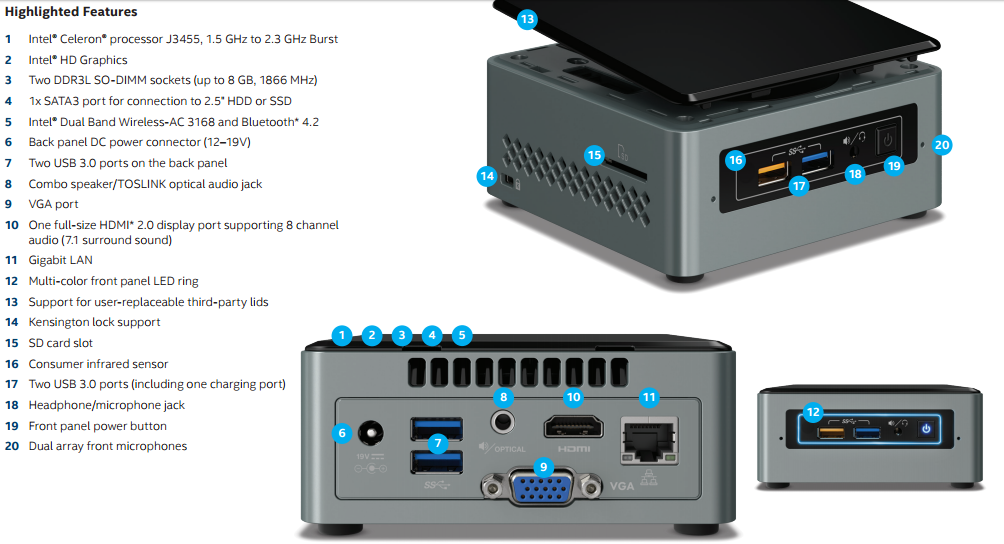
Intel New Unit of Computing or  more simply NUC is a 4×4-inch mini-PC (barebone) and is about 1.5-2 in. thick (thickness depends on model) with built-in CPU (from Atom/Celeron to Core i7), integrated graphics, customizable board for storage and memory.

Furthermore, almost all models also come with integrated Wi-Fi, Bluetooth modules, card readers and even with dual microphones.

NUC is completely fanless and noiseless (except of Skull Canyon NUC series which is oriented to gamers). Some of NUC kits can also be shipped with the pre-installed SSD and memory. List of currently available kits is here .

The number following the “NUC” indicates it’s generation. The latest NUC generation is 7 for now. You need to check launch date and gen id in description of each kit before buying. Example: NUC6CAYH belongs to the Intel NUC 6th generation and launched at Q4’16

Some NUC analogs: Gigabyte BRIX , Asus VivoMini series

My NUC

Well, It’s not mine anymore ‘cause I bought it to my parents Улыбка. Anyway, I spent 3 days working with NUC6CAYH and really enjoyed it. It’s definitely what I searched for.

  • VGA port is on board (monitor is good but doesn’t support DVI and etc),
  • dual array microphones (no additional costs for headphones),
  • noiseless and with the latest Apollo Lake Celeron J3455 CPU

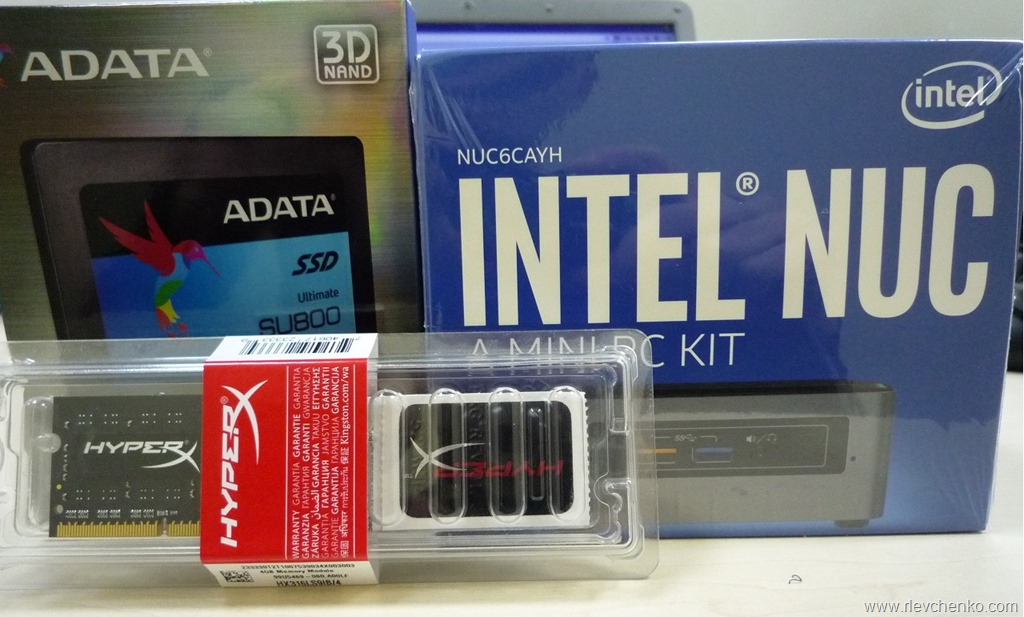
Recommended price for this kit is just 139$. Additionally, don’t forget to count SSD (m.2 or sata) and memory.

Be aware that SSD must have up to 9.5 mm thickness and memory should be verified for compatibility at the manufacturer’s official site

I bought and installed 1 x A-Data SU800 with 3DNAND and 1 x Kingston HyperX Impact with good timings (I don’t need dual-channel yet)

So my costs totalled approximately 270$

image

Installation is quite simple and takes 2 minutes (use instructions that come with your NUC). Actually, you just need to unfasten 4 screws and place ssd, memory. No cables required.

intelnuc

NUC’s bios is not advanced and it usually does not require any configuration. Just leave default settings

TIP: NUC comes with blue indicator color for HDD activity and power leds. You can change them in bios in power section.


Install OS as usual (my NUC supports only Windows 10 x64). It took me about 5-6 minutes to get Windows 10 installed.

Then upgrade your NUC using the special bundle which is available at Intel support site in order to get the latest bios and drivers.

image

Test results

CPU

As you can see, it’s better than Pentium N3700 but still far from NUC Kits based on Core i3

cpu test results intel nuc

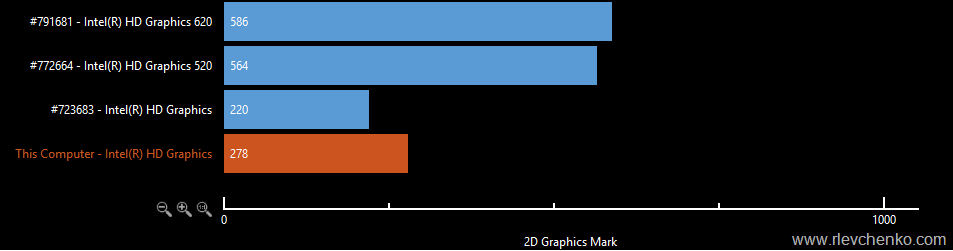
2D Graphics

gpu test results intel nuc Continue reading “Quick overview of Intel NUC”

How important it is to keep your desktops secured and how easily it can be achieved?

Desktop security is one of the high priority domains to most organizations for maintaining stability and productivity. Managing your desktops effectively with zero downtime and with crystal clear desktop security can be little challenging, because patches and updates for different software across the market is not always stable.

Considering the NVD data for vulnerability in 2014 there were 19 vulnerabilities reported per day, at first when you look at this number there is nothing alarming, but when we extra polite this number to a week it will be 133 vulnerabilities per week and 570 for a month. And if we populate this further for a year, it will be around 7000. Desktop security has to be prioritized to avoid these vulnerabilities one step at a time.

Now let’s consider an enterprise has around 1000 computers, so totally there would have been 70,000 vulnerabilities in the year 2014 for this enterprise. Then moving forward to 2015 there were 25 vulnerabilities per day, an increase of 30% compared to 2014, 6435 security vulnerabilities in 2016 and around 2500 vulnerabilities so far in 2017. Proper management and update of these vulnerabilities will help the enterprises in Desktop Security.

Desktop Security and Patch Management


System administrator goes for war against vulnerabilities

Let me tell you a story that will explain things in a better way, hope you guys are familiar with David and Goliath story. Consider David as your system administrator and Goliath as your network of vulnerabilities.If these vulnerabilities keep growing day by day, it will eventually make Goliath stronger, leaving David totally weak.

Now what David did was, he used a sling to hit Goliath and finally defeated him. That’s exactly what your system administrators have to do, they need to take the right tool to defeat this Goliath of vulnerabilities.

Let’s start our journey in understanding desktop security.

How dangerous can a vulnerability be to your enterprise?

Let’s look into some real-time scenarios for understanding the need for Desktop Security,

Scenario 1:

Heartbleed Bug incident that created a huge security breach for most of the websites. The Heartbleed Bug is a serious vulnerability in the popular OpenSSL cryptographic software library. This Heartbleed bug allows anyone on the Internet to read the memory of the systems protected by the vulnerable versions of the OpenSSL software. It allows attackers to eavesdrop on communications, steal data directly from the services and users, to impersonate services for users. Two out of three websites were affected by this bug.

Scenario 2:

Operation clandestine fox for Internet explorer, is a vulnerability in internet explorer which allows the attacker to get the complete information of the victim’s computer. It affected the IE version 6 and above whenever a user visited a malicious website. According to Fire eye’s security analysis forum, the vulnerabilities discovered by cyber criminals remain unknown. Since the threat caused by this bug remains unknown, hope it would have caused some serious consequences.

Scenario 3:

There was a big incident in Adobe flash last year. Successful exploitation of this vulnerability, will allow the attacker to take control of the user system who uses adobe flash, if the vulnerability was not patched. Now adobe released patch for this vulnerability only after 4 days, which made the system administrator to patch all the systems in 2 or 3 days before any attacker will exploit this vulnerability.

How to tackle these situations and achieve desktop security?

System administrators have to deal with these complex vulnerabilities and also act quickly to avoid security breach into your enterprise and ensure desktop security. With a heterogeneous platform system administrators will find it difficult to handle these vulnerabilities, adding to all these critical updates, non-critical updates and zero day updates are going to make his work an absolute headache.

Desktop Security and Patch Management

System administrators are in need of a patch management software which can deal with all these complexity with at most simplicity. It has to scan and identify missing patches in your enterprise, test and deploy them automatically, help the system administrators to configure schedules for deployment of patches, disable automatic updates, exclude a group and deploy patches based upon user requirements, which will ultimately lead to better desktop security.

But will this alone help in desktop security?

System administrators has to deploy new software, deal with help desk tickets, keep a record of hardware and software that are connected to your network, troubleshoot remote systems, deal with downtime, deploy various configurations for computers and users. These are fundamental necessities for an effective desktop management and enhanced desktop security.

Desktop Security and Patch Management

All system administrators can be smart: Continue reading “How important it is to keep your desktops secured and how easily it can be achieved?”