
Technical Review: Practical Automation with PowerShell

It’s becoming increasingly difficult to find a standout book on PowerShell in today’s crowded market. I’m sure everyone is familiar with such books as:

  • “Learn PowerShell in a Month of Lunches” (best for newbies)
  • “Learn PowerShell Scripting in a Month Lunches” (best for learners).
  • “Windows PowerShell in Action” (best handbook)

Let’s assume you have read the first two and are trying to find the next one to completely master PowerShell skills, get more practice, and gain insights. Allow me to introduce “Practical Automation with PowerShell” by Matthew Dowst.

Surprisingly to me, this book became my favorite (despite having read several bestsellers, some of which are mentioned above), and I thoroughly enjoyed both reading and reviewing it. The main reason is its comprehensive table of contents, which addresses everything one encounters on a daily basis: automation of clouds, on-premise servers, databases, and other essential tasks.

Click to see TOC
  • 1. POWERSHELL AUTOMATION
  • 2. GET STARTED AUTOMATING
  • 3. SCHEDULING AUTOMATION SCRIPTS
  • 4. HANDLING SENSITIVE DATA
  • 5. POWERSHELL REMOTE EXECUTION
  • 6. MAKING ADAPTABLE AUTOMATIONS
  • 7. WORKING WITH SQL
  • 8. CLOUD-BASED AUTOMATION
  • 9. WORKING OUTSIDE OF POWERSHELL
  • 10. AUTOMATION CODING BEST PRACTICES
  • 11. END-USER SCRIPTS AND FORMS
  • 12. SHARING SCRIPTS AMONG A TEAM
  • 13. TESTING YOUR SCRIPTS
  • 14. MAINTAINING YOUR CODE
  • APPENDIX A: DEVELOPMENT ENVIRONMENT SET UP

The book teaches you how to design, write, test and maintain your scripts. If you work as a part of team – this book is also for you: “Handling sensitive data” and “Sharing scripts among a team” chapters are awesome and extremely helpful. Additionally, it covers integration with Jenkins, Azure Automation and Azure Functions. Consequently, after reading the book, you will be able to execute automations in mixed environments with different sets of services.

I highly recommend this book to anyone passionate about PowerShell. However, if you’re just starting out, I suggest beginning with “month of lunches” books before diving into this one to refine your skills and develop an automation engineer’s mindset.

Kudos to the author for an excellent work!
Application Gateway: Incorrect certificate chain or order

SSL management is always a pain. We should check SSL certificates periodically or implement a solution that carries all management tasks for us (let’s encrypt and cert-manager, for instance). And if there is an issue with a certificate, it’s a always a subject of downtime, so we have to find a solution as quickly as possible. Furthermore, all websites should meet requirements to complete tests and get a “green” mark from mozilla observatory or ssl shopper checker, for example. In this post, we’ll discuss possible issues you may face during the ssl check: “incorrect certificate chain” or “incorrect order. contains anchor”

Please note that my setup includes azure application gateway and azure kubernetes service. The following steps are general, however, may require using different certificate formats or signature algorithms. Check your environment’s requirements beforehand.

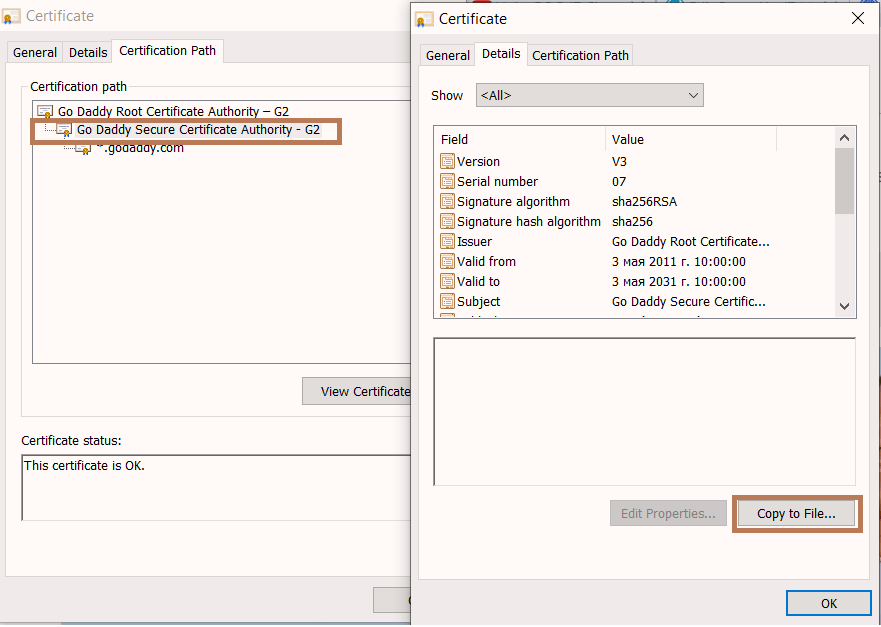
  • In my case, it was a wrong intermediate certificate provided by GoDaddy. So, I went to the godaddy site, clicked on certificate and copied intermediate certificate to cer file intermediate.cer
Godaddy.com > Intermediate certificate
  • Make sure you have openssl on your computer and create a new pfx that contains a certificate, private key and intermediate certificate:
    openssl pkcs12 -export -out appgw-cert.pfx -inkey .\pk.key -in .\ssl.crt -certfile .\intermediate.cer
  • If you have an old pfx with a valid certificate and key, do these commands:
    openssl pkcs12 -in old.pfx -nocerts -nodes -out pk.key
    openssl pkcs12 -in old.pfx -clcerts -nokeys -out cert.crt
    openssl pkcs12 -export -out new.pfx -inkey .\pk.key -in .\cert.crt -certfile .\intermediate.cer
  • Type password for the pfx, and then update azure application gateway if needed:
    $appGW = Get-AzApplicationGateway -Name "ApplicationGatewayName"ResourceGroupName "ResourceGroupName"
    $password = ConvertTo-SecureString $passwordPlainString -AsPlainText -Force
    $cert = Set-AzApplicationGatewaySslCertificate -ApplicationGateway $AppGW -Name "CertName" -CertificateFile "D:\certname.pfx" -Password $password
  • Also, export pfx certificate to your personal certificate store and make sure that the correct chain is used or use ssllabs.com for already updated certificate.
ssllabs.com and certificate chain
  • ..and finally my certificate is “green”
ssllabs.com and overall rating