
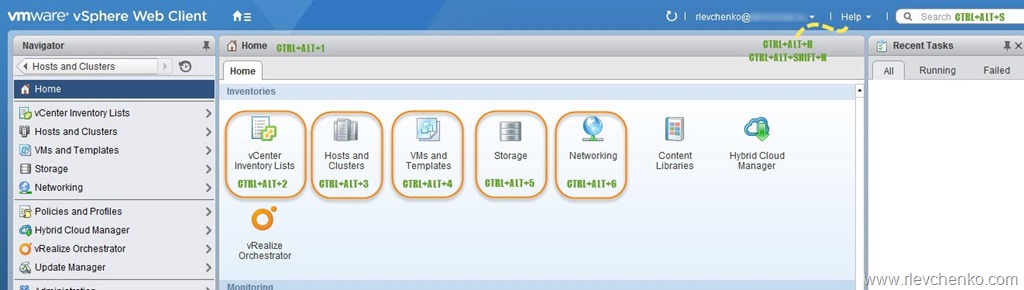
| Operation | Action | Comments |
|---|---|---|
| CTRL+ALT+1 | Navigates to vSphere Web Client Home | – |
| CTRL+ALT+2 | Navigates to vCenter Inventory Lists | – |
| CTRL+ALT+3 | Navigates to vCenter Hosts and Clusters | – |
| CTRL+ALT+4 | Navigates to VMs and Templates | – |
| CTRL+ALT+5 | Navigates to Storage | – |
| CTRL+ALT+6 | Navigates to Networking | – |
| CTRL+ALT+S | Focuses your cursor in the search box | To initiate quick search |
| CTRL+ALT+H | Opens vSphere Documentation Center start page | http://pubs.vmware.com/vsphere-60/index.jsp?lang=en_US |
| CTRL+ALT+SHIFT+H | Displays context-sensitive help | It’s useful when you are not sure what you need to choose to get the right configuration. For example, you are adding new distributed switch and don’t know what version of DS you should use. Just press the following keys and appropriate article in the documentation center will be opened automatically. Timesaver! |

