
Before proceeding with any steps, please make sure to create a complete backup of your ClickHouse data. In the post, I assume you have an additional disk without any partitions on it.
Start by creating a new partition (LVM is being used below). If you have a cluster, repeat the steps on each node.
# Create partition
lsblk # get dev name
fdisk /dev/sdb # use 8e type, other settings are default
lsblk # check
pvcreate /dev/sdb1 # create a volume
pvdisplay # check volumes
vgcreate clickhouse /dev/sdb1 # create a volume group
lvcreate --name data -l 100%FREE clickhouse # create a logical volume
mkfs.ext4 /dev/clickhouse/data # make ext4 fs
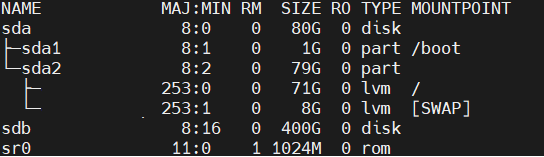


Add a new mount point to the /etc/fstab:
# edit fstab, following best practices - use noatime option
# /etc/fstab, use UUID or /var/lib/clickhouse defaults,noatime
# if UUID is used, run blkid /dev/mapper/clickhouse-data

# Example
/dev/mapper/clickhouse-data  /var/lib/clickhouse ext4  defaults,noatime     0       0
If you have a cluster, identify the shard/replica and check the replication queue.
SELECT database,table,source_replica FROM system.replication_queue;

SELECT cluster,host_name,shard_num,shard_weight,replica_num FROM system.clusters ORDER BY shard_num;
On each replica in a shard, one by one:
# Stop ch server
sudo systemctl stop clickhouse-server

# prepare dirs
mv /var/lib/clickhouse /var/lib/clickhouse-tmp
mkdir /var/lib/clickhouse
chown clickhouse:clickhouse /var/lib/clickhouse

# activate the mount defined in the fstab
mount /var/lib/clickhouse

# copy data
cp -R /var/lib/clickhouse-tmp/* /var/lib/clickhouse/
chown -R clickhouse:clickhouse /var/lib/clickhouse

# get ch server back
sudo systemctl start clickhouse-server
Check the databases, tables, and ClickHouse server state (error logs; usually they are located here: /var/log/clickhouse-server/clickhouse-server.err.log).
If everything works fine, delete the temporary directory rm -rf /var/lib/clickhouse-tmp and check disk space with df -h
 UseIT | Roman Levchenko