Does Lync Server 2013 support AlwaysON AG?
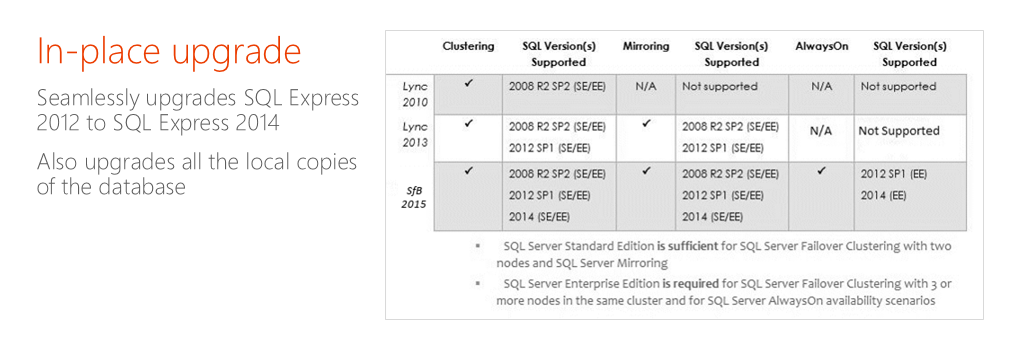
Officially, Lync Server 2010/2013 doesn’t support AlwaysOn AG as BackEnd. *whispered* But it works.
Your options: use Failover Clustering/Mirroring (not supported in LS 2010)
Note: Mirroring is now officially deprecated
Is Microsoft going to add AlwaysOn as supported BackEnd for Lync Server?
At the Lync Conference, Las Vegas, February 2014 , Microsoft announced that support for AlwaysOn Availability Groups would be forthcoming in a future update (Q3, 2014). As I know, Microsoft changed these plans and moved AG support to Skype For Business. It’s very hard to say will ever be released update for Lync Server 2013. I predict , it won’t. MS has changed focus and will focus on Skype4B.
Are there any requirements/limitations in Skype4B + AlwaysON?
Skype for business supports SQL Server 2008 R2 SP2/ 2012 SP1 and 2014 . If you want to implement AlwaysON you have to use 2012 SP1 or 2014 Enterprise Editions and keep in mind that Skype4B:
- supports having replicas only in the same subnet
- supports only the synchronous-commit mode
- supports the Automatic Failover mode
- don’t support for read access on the secondary replicas
- don’t support for having an off-site replicas in Azure


 UseIT | Roman Levchenko