
Technical Review: Practical Automation with PowerShell

It’s becoming increasingly difficult to find a standout book on PowerShell in today’s crowded market. I’m sure everyone is familiar with such books as:

  • “Learn PowerShell in a Month of Lunches” (best for newbies)
  • “Learn PowerShell Scripting in a Month Lunches” (best for learners).
  • “Windows PowerShell in Action” (best handbook)

Let’s assume you have read the first two and are trying to find the next one to completely master PowerShell skills, get more practice, and gain insights. Allow me to introduce “Practical Automation with PowerShell” by Matthew Dowst.

Surprisingly to me, this book became my favorite (despite having read several bestsellers, some of which are mentioned above), and I thoroughly enjoyed both reading and reviewing it. The main reason is its comprehensive table of contents, which addresses everything one encounters on a daily basis: automation of clouds, on-premise servers, databases, and other essential tasks.

Click to see TOC
  • 1. POWERSHELL AUTOMATION
  • 2. GET STARTED AUTOMATING
  • 3. SCHEDULING AUTOMATION SCRIPTS
  • 4. HANDLING SENSITIVE DATA
  • 5. POWERSHELL REMOTE EXECUTION
  • 6. MAKING ADAPTABLE AUTOMATIONS
  • 7. WORKING WITH SQL
  • 8. CLOUD-BASED AUTOMATION
  • 9. WORKING OUTSIDE OF POWERSHELL
  • 10. AUTOMATION CODING BEST PRACTICES
  • 11. END-USER SCRIPTS AND FORMS
  • 12. SHARING SCRIPTS AMONG A TEAM
  • 13. TESTING YOUR SCRIPTS
  • 14. MAINTAINING YOUR CODE
  • APPENDIX A: DEVELOPMENT ENVIRONMENT SET UP

The book teaches you how to design, write, test and maintain your scripts. If you work as a part of team – this book is also for you: “Handling sensitive data” and “Sharing scripts among a team” chapters are awesome and extremely helpful. Additionally, it covers integration with Jenkins, Azure Automation and Azure Functions. Consequently, after reading the book, you will be able to execute automations in mixed environments with different sets of services.

I highly recommend this book to anyone passionate about PowerShell. However, if you’re just starting out, I suggest beginning with “month of lunches” books before diving into this one to refine your skills and develop an automation engineer’s mindset.

Kudos to the author for an excellent work!
Python Coding: FizzBuzz challenge

FizzBuzz is a very common task, asked in Dev/DevOps interviews. You are given a range of numbers and need to write algorithm using the following rules: if the number is divisible by 3, print “Fizz”; if the number is divisible by 5, output “Buzz”; if the number is divisible by both 3 and 5, the result should be “FizzBuzz”.

The main goal of the task is to check how you understand loops, conditionals and simple math using one of programming or scripting languages. I solved the task using PowerShell years ago: check this gist.

As I started to learn Python, I decided to share FizzBuzz implementation in this language to show how simple and “elegant” the solution can be.

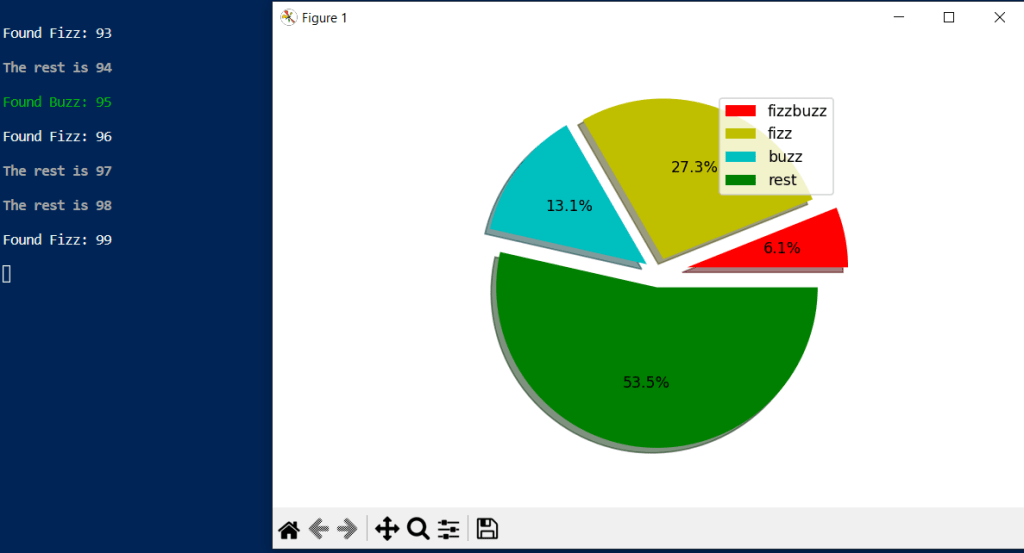
I used matplotlib and colorama to make a pie chart and add color text output respectively. Defined a function fizz_buzz with 2 arguments, and then used try/catch/finally statements to catch exceptions errors. Inside of the try, the for loop and if conditionals are described to meet all task’s rules. As a result, the function outputs numbers and categories based on rules, and makes a pie chart to show how many fizz, buzz, fizzbuzz found in percentage.

import matplotlib.pyplot as plt
import colorama
from colorama import Fore, Back, Style
colorama.init()

def fizz_buzz(x,y):
    """Python version of popular Fizz Buzz task"""
    fb = 0 ; b = 0; f = 0; rest = 0 # start values
    fb_type = ['fizzbuzz','fizz','buzz','rest'] # plot labels
    fb_colors = ['r','y','c','g'] # plot colors
    fb_explode = [0.2, 0.1, 0.1, 0.1] # plot fraction of the radius
    try:
        for n in range(x,y):
            if ((n % 3 == 0) and (n % 5 == 0)):
                fb += 1
                print(Fore.RED + f"Found FizzBuzz: {n}")
            elif n % 3 ==0:
                f += 1
                print(Fore.WHITE + f"Found Fizz: {n}")
            elif n % 5 ==0:
                b += 1
                print(Fore.GREEN + f"Found Buzz: {n}")
            else: 
                rest += 1
                print(Style.BRIGHT + f"The rest is {n}")
            print(Style.RESET_ALL)
        fb_array = [fb, f, b, rest]
        plt.pie(fb_array, colors = fb_colors, explode = fb_explode, shadow = True, radius = 1.1, autopct = '%1.1f%%') # form a pie
        plt.legend(fb_type,loc='upper right') # show legend
        plt.show() # show a pie
    except:
        print(Style.BRIGHT + Fore.RED + "You provided wrong x and y")
        print(Style.RESET_ALL)
    finally:
        print(Style.BRIGHT + Fore.GREEN + "Author: github.com/rlevchenko")
        print(Style.RESET_ALL)

Result

Available at Gist