vCenter 503 Service Unavailable

1. You have just updated vCenter (in my case, VCenter Appliance with PSC 6.0 to 6.0U2)

2. You have restarted vCenter, waited for ~ 10 minutes and trying to open web sphere client

3. Unfortunately,error appears:

503 Service Unavailable (Failed to connect to endpoint: [N7Vmacore4Http20NamedPipeServiceSpecE:0x7fb16c058ad0]

_serverNamespace = / _isRedirect = false _pipeName =/var/run/vmware/vpxd-webserver-pipe)

OR Information message:

The vSphere Client web server is initializing

4. To fix it go to VAMI (https://<vcenter fqdn>:5480) and check overall health status.

vcenter appliance health status

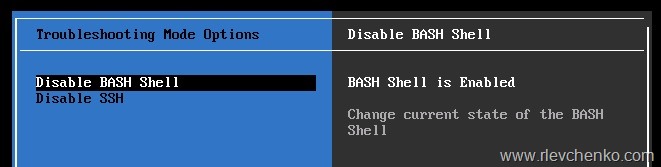
5. To check services manually, enable SSH and BASH from html client

image

6. Or login to direct console (DCUI) and enable SSH/BASH from there

ssh console vcenter

7. Open Putty and connect to vCenter Appliance, type root password and shell

image

8. Check status of services again

image

9. Check vSphere web client service status

service vsphere-client status

10. Try to restart or start service and check status after manipulations

To restart:

service vsphere-client restart

To stop and start manually:

service vsphere-client stop
service vsphere-client start

11. vSphere Web Service should be running and overall health indicator status is green or, at least, yellow

image

vcenter appliance health status 2

12. Try to open vSphere Web Client

Note:  you also need to make sure that there are no issues with DNS and IP allocations in your network (DNS is available, there are no IP duplicates, firewall deny rules and etc.)

References:

Linux Integration Services 4.1

Get a little more from  Linux guests on Hyper-V and Azure.

New version of LIS with the latest bug fixes, features and performance improvements is available to download .

LIS 4.1 for Hyper-V provides the additional functionality over LIS 4.0 

  • Installable on Red Hat Enterprise Linux 5.2, 5.3, 5.4, and 7.2
  • Installable on CentOS 5.2, 5.3, 5.4, and 7.2
  • Installable on Oracle Linux 7.2 when running the Red Hat Compatible Kernel
  • Hyper-V Sockets
  • Manual Memory Hot-Add
  • SCSI WWN
  • lsvmbus
  • Uninstallation script

LIS 4.1 is applicable to the following guest operating systems:

  • Red Hat Enterprise Linux 5.2-5.11 32-bit, 32-bit PAE, and 64-bit
  • Red Hat Enterprise Linux 6.0-6.7 32-bit and 64-bit
  • Red Hat Enterprise Linux 7.0-7.2 64-bit
  • CentOS 5.2-5.11 32-bit, 32-bit PAE, and 64-bit
  • CentOS 6.0-6.7 32-bit and 64-bit
  • CentOS 7.0-7.2 64-bit
  • Oracle Linux 6.4-6.7 with Red Hat Compatible Kernel 32-bit and 64-bit
  •  Oracle Linux 7.0-7.2 with Red Hat Compatible Kernel 64-bit

For more information , please use this link to download full description (Linux Integration Services v4-1.pdf)  and RPMs/ISO files