
VMware offers different supported ways (from manual to fully-automated) to patching and upgrading your current vSphere infrastructure. Depending on what version and products are installed in your environment, the correct choice will be different . If you already have vCenter Server on your site, vSphere Update Manager (VUM) is the most recommended method.
With VUM you can patch and upgrade ESXi hosts (version 5.0 and later), VMware tools, VM hardware and even some of virtual appliances. VUM integrates with vCenter and it’s services such as Distributed Resource Scheduler (DRS) or Distributed Power Management (DPM). That kind of integration eliminates downtimes and interruptions of your applications during migration or upgrading vSphere components.
The old (but it’s still on a board) vSphere desktop client (or just “C# client) was the preferable way to manage VUM functionality. VUM integration with web client was badly limited.
But starting from vSphere 6, web client is becoming the preferable way to manage your entire environment. In the vSphere 6 CU1 VUM has been FULLY integrated to web-client. So, C# client is not necessary and, by the way, it’s going to be deprecated after the next major vSphere release. Let’s say “thank you and bye, bye” .
Before you deploy VUM, make sure that your environment meets the following requirements:
- installed and configured vCenter (appliance or windows-based)
- network connectivity to vCenter from the VUM instance
- 1 VUM per 1 vCenter. If you have more than one vCenter server in linked mode or not, you need to install separate VUM instance for each vCenter
- 2 Gb RAM if VUM and vCenter are not installed on the same machine
- 8 Gb RAM if VUM and vCenter are on the same machine
- at least 10/100 Mbps between vCenter and VUM. 1 Gb and above is recommended
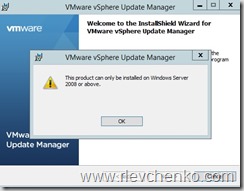
- Windows Server 2008 and above (x64 only!) + it’s not supported to place VUM on a domain controller
- VUM requires SQL Server of Oracle database. Update Manager can handle small-scale environments using the bundled SQL Server 2012 Express . Medium and large environments (from 5 hosts and 50 VMs) requires individual database server which is separated from vCenter database. To specify placement and additional requirements, I strongly recommend to use vSphere Update Manager Sizing Estimator (simple XLS-file). Depending on hosts and virtual machines number, this tool generates recommendations for VUM’s disk space utilization size and database server arrangement (see the picture below).

- VUM bits are only available as the part of windows-based vCenter ISO. Download it and mount before installation.
- Check that the following ports are opened


| Name | Direction | Comments |
|---|---|---|
| TCP 80 | VUM -> vCenter | Connection to vCenter |
| TCP 9084 | Hosts -> VUM | Host patch downloads |
| TCP 902 | VUM -> ESXi | Push VMs and host upgrade files |
| TCP 80, 443 | VUM -> WAN | Access to online repository (vmware.com) |
| TCP 9087 | Client Plug-in -> VUM | Uploading upgrade files |
| TCP 8084 | Client Plug-in -> VUM | VUM SOAP service |
| TCP 9000-9100 | VUM -> WAN | Alternative ports (if you are not planning to use 80,443) |
Installation
VUM installation is straightforward. Mount ISO with Windows-based ISO, go to VUM section and select Server. I will use embedded database based on SQL Server 2012 Express and Windows Server 2012 R2 (as mentioned earlier , database placement and version really depends on your environment size, so carefully plan this step). Define vCenter FQDN or IP, ports leave with default values (if you don’t have special own requirements). All steps are shown on the pictures below.
Note: Wizard shows and attention message, If your system has less than 120 Gb space
Note: you may notice the additional option under vSphere Update Manager installation : Download Service. Download service is very helpful when you are planning to deny external access on VUM machine and download updates from different machine, which can be located in DMZ as well. Additionally, it’s recommended to deploy Download Services separately when you have multiple vCenter instances and therefore many VUMs. In this case, VUMs downloads updates and patches from centralized repository. Download Services thus essentially reduces incoming external traffic.


TIP: to upgrade from previous VUM version you need to choose “Yes, I want to upgrade my Update Manager database and I have taken a backup of the existing Update Manager database” option on the database upgrade page. VUM 6.0 supports upgrades only from VUM 5.x . So, if you have VUM older that 5.x, you need to migrate it to 5.x and then to 6.0. Also keep in mind that VUM 5.x and 6.0 requires 64-bit OS.
TIP: if you’d like to change settings after VUM installation and don’t want to open web-client, you may run “<system drive>:\Program Files (x86)\VMware\Infrastructure\Update Manager\VMwareUpdateManagerUtility.exe” . This tool allows to define proxy, database, vCenter IP address and SSL Certificate settings
After the successful installation, open the vSphere web client and you’ll see the newly added icon called as “Update Manager” under the Monitoring section + context menu will be updated too (right click on host/vm/cluster – Update Manager)

Click on this icon and the list of installed VUMs will be shown at the next window.
Then just click on VUM’s IP to manage it’s properties.
Management
Before you start VUM’s configuration you need to understand it’s terminology that based on baselines, remediation and compliance.
Baselines are set of patches and upgrades. VUM uses them to keep your hosts , VMs, VA up-to-date. Set of baselines is called as “Baseline group”.
There are two different baseline’s type – dynamic and fixed. Dynamic baseline downloads all updates and patches that meets predefined criteria. If you go to Manage-Host Baselines you will see 2 pre-built dynamic baselines. To get criteria’s value , right click on one – Edit baseline – Criteria .
In the following picture, dynamic baseline for downloading only critical updates and patches for all products is shown:

In the other hand, fixed baseline contains added specific patches from repository. It does not download any others. It’s just fixed. Can be used when you want to manually add list of unique patches and attach them to hosts. All baselines, created by default, are Dynamic.
You can add more than one baseline and merge them into baseline groups. Then this baseline group need to be attached to hosts/VMs or VA to scan updates and getting compliance status.
The compliance statuses of objects can be All Applicable, Non Compliant, Incompatible, Unknown, and Compliant.
To attach baselines or baseline group : Hosts and Cluster-cluster or hostname-Manage-Update Manager-Attach Baseline
Or just right click on host/vm/cluster -update manager-attach baseline
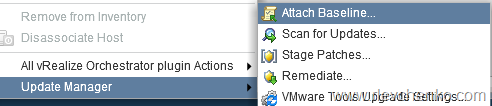
If compliance status is unknown , it means that Update Manager does not have any information about these objects attached to individual baselines or baselines group.
To get it just execute scan for updates on the selected hosts or VMs and compliance status will be updated. To do it, go to hosts and cluster view , click on host- or cluster name, choose Update manager section and run Scan For updates

TIP:”Stage Patches” allows you to copy required files to host before remediation. It’s helpful when you have slow links between VUM and some of vSphere objects
TIP: to upgrade hosts you have to add appropriate images to the ESXi images. List of VA upgrades updates automatically (use filter to find the right product). To add specific patch zip – click on “Import patches” under the Patch Repository @VUM Admin View
In my case , compliance status is Compliant. So, my hosts are up-to-date and have all updates that linked to the attached baselines.
If you have hosts with non-compliant status, it’s time to start remediation.
Remediation is a process of applying updates and patches. You can run remediation right now or schedule it to the preferred time
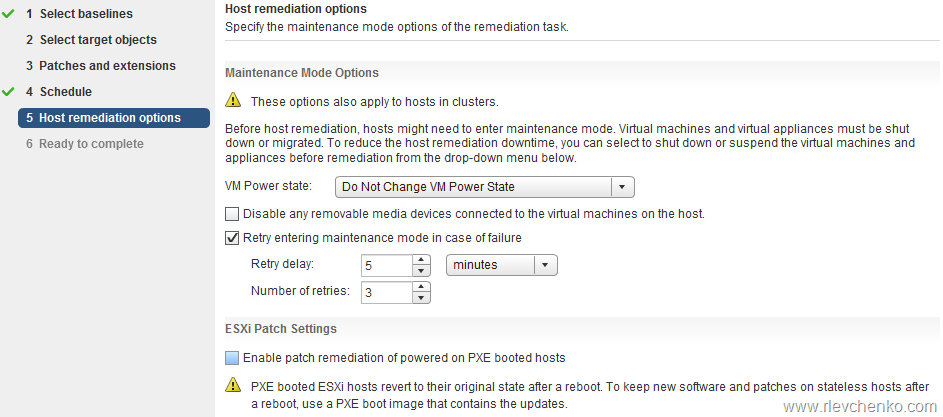
Additionally you may override parent settings for the maintenance mode
TIP: Baseline groups are the main component of orchestrated update. If you want to implement it, you need to create 2 different baseline groups for virtual machines (VM tools upgrade + VM hardware) and hosts (critical/non-critical updates and upgrade files , for example) and schedule them in the right order: host remediation (first step is upgrading ESXi hosts and second, applying patches), VM remediation (1. VM hardware upgrade 2.VM Tools ugrade). Keep in mind that downtime is needed for upgrading ESXi hosts and VM hardware (VMs must be powered off)
Main VUM settings are located under the Home-Update Manager- Manage-Settings or you can jump to the admin window from host and cluster section by clicking on “Update Manager-“Go to admin view..”
You can set download options, schedule, network parameters and etc. I’m not going to review all of them. Let’s talk about the most interesting.
vApp Setting – Smart Reboot after remediation (Enabled by default)
As you know, vApp is a “special” resource pool and collection of VMs with specific dependencies. (for example, Virtual Machine Manager , SQL Server and Active Directory). And in that way VMM cannot work without SQL Server and Active Directory. Let’s assume VUM want to update SQL Server in this vApp and reboot is required after updating. If SQL Server becomes unavailable, VMM services don’t work too. So, VUM “smart reboots” not only SQL Server but and VMM as well (delay is on. VUM waits while critical service is up (in our case, SQL Server) and reboots other services with dependencies). More simply, VUM uses vApp startup settings.
Note: review Impact column at Patch Repository tab to get possible impact of any patches

Allow installation of additional software on PXE booted hosts
You can configure Update Manager to let other software initiate remediation of PXE booted hosts. The remediation installs patches and software modules on the hosts, but typically the host updates are lost after a reboot.To retain updates on stateless hosts after a reboot, use a PXE boot image that contains the updates. You can update the PXE boot image before applying the updates with Update Manager, so that the updates are not lost because of a reboot. Update Manager itself does not reboot the hosts because it does not install updates requiring a reboot on PXE booted hosts
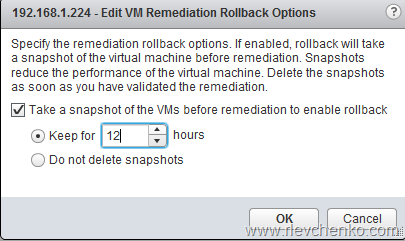
Take a snapshot of the VMs before remediation to enable rollback & Snapshot Policy
Before remediation of VMs , VUM can take snapshots and keep them for the specified time interval or do not delete them at all. In production environments snapshots can be the reason of poor storage performance. So, it’s not a good idea to leave the default “do not delete snapshots”. Check for updates , remediate host , in 12-24 hours check that all guest services are working as required and manually delete snapshots then.
PowerCLI and vSphere Update Manager
vSphere Update Manager has it’s own module at PoweCLI and this fact makes VUM’s automation easier

List of commands:
PowerCLI C:\> get-command -Module VMware.VumAutomation

CommandType     Name                                               Version    Source
-----------     ----                                               -------    ------
Alias           Attach-Baseline                                    6.0.0.0    VMware.VumAutomation
Alias           Detach-Baseline                                    6.0.0.0    VMware.VumAutomation
Alias           Download-Patch                                     6.0.0.0    VMware.VumAutomation
Alias           Remediate-Inventory                                6.0.0.0    VMware.VumAutomation
Alias           Scan-Inventory                                     6.0.0.0    VMware.VumAutomation
Alias           Stage-Patch                                        6.0.0.0    VMware.VumAutomation
Cmdlet          Add-EntityBaseline                                 6.0.0.0    VMware.VumAutomation
Cmdlet          Copy-Patch                                         6.0.0.0    VMware.VumAutomation
Cmdlet          Get-Baseline                                       6.0.0.0    VMware.VumAutomation
Cmdlet          Get-Compliance                                     6.0.0.0    VMware.VumAutomation
Cmdlet          Get-Patch                                          6.0.0.0    VMware.VumAutomation
Cmdlet          Get-PatchBaseline                                  6.0.0.0    VMware.VumAutomation
Cmdlet          New-PatchBaseline                                  6.0.0.0    VMware.VumAutomation
Cmdlet          Remove-Baseline                                    6.0.0.0    VMware.VumAutomation
Cmdlet          Remove-EntityBaseline                              6.0.0.0    VMware.VumAutomation
Cmdlet          Set-PatchBaseline                                  6.0.0.0    VMware.VumAutomation
Cmdlet          Sync-Patch                                         6.0.0.0    VMware.VumAutomation
Cmdlet          Test-Compliance                                    6.0.0.0    VMware.VumAutomation
Cmdlet          Update-Entity                                      6.0.0.0    VMware.VumAutomation
To get baselines:
#Variable for credential
$cred=get-credential

#Connect to vCenter Server
Connect-VIServer -Server vCenterFQDN -Credential $cred

#Get all baselines
Get-Baseline
To get specific baselines:

Summary
VUM is a quiet simple and powerful tool to reduce security risks in your infrastructure by implementing new updates and patches. It updates and upgrades hosts , virtual machines (hardware version , tools), virtual appliances and others. Integration with all main vSphere functions such as vApp, DRS, DPM, Fault Tolerance makes updating process smarter with maintenance mode, vmotions and all other technologies that curtail downtime of your applications. If you are familiar with Microsoft technologies, you can compare VUM with WSUS (+integration with VMM) + Cluster-Aware updating. What is much powerful and flexible? Comments are open 
Until then,
have a nice working days!
P.S. VMware vSphere Update Manager 6.5 is now embedded into the vCenter Server Appliance http://bit.ly/2gI89p3
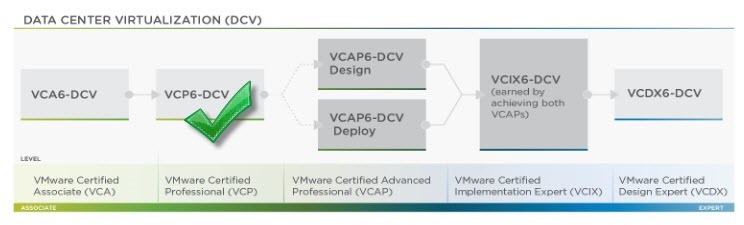
 , I have never been certified for vSphere, so for completely new candidates you must pass the following exams:
 UseIT | Roman Levchenko